
The Saudi embassy fees UAE residents pay for attestation are settled online, through the ratification platform of the Saudi Ministry of Foreign Affairs, in four stages: you submit a new attestation request and choose the mission (Dubai or Abu Dhabi), you receive a request number and an invoice number, you pay the fee against that invoice, and you print the receipt to take with you. The fee is collected electronically, not in cash.
These stages come before your visit; they do not replace it. Each step below follows what you will see on screen.
Start your request on WhatsApp if you would rather we handle the whole process for you.
Before you open the platform
Have four things ready:
- The original document, already attested by the UAE Ministry of Foreign Affairs. The Saudi mission will not accept it without that stamp, and the details are on our page about UAE Ministry of Foreign Affairs attestation.
- Your passport or ID, so that you can copy your name and number exactly as they appear.
- A working mobile number and email address.
- The right mission for your document: the consulate in Dubai handles documents issued in Dubai, Sharjah, Ajman, Umm Al Quwain, Ras Al Khaimah and Fujairah, and the embassy in Abu Dhabi handles documents issued in Abu Dhabi.
To tell the two missions apart, see our article on the Saudi embassy UAE.
Saudi embassy fees UAE: the steps to pay
1. Open the official platform
Open the ratification platform and check that the address reads ratification.mofa.gov.sa and ends in gov.sa before you enter any detail, as a guard against copycat sites. The Ministry describes the service on its document attestation service page (in Arabic).
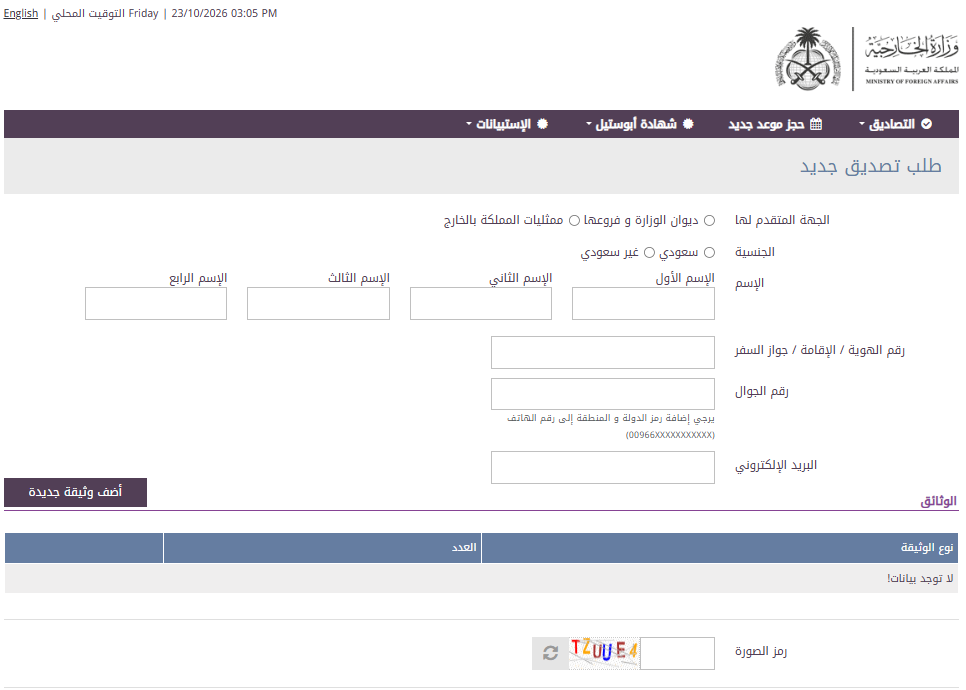
2. Choose the entity and the mission
In the “applying entity” field, choose the Kingdom’s missions abroad (in Arabic, «ممثليات المملكة بالخارج»), not the Ministry and its branches. A list of missions appears. Pick “Dubai” or “Abu Dhabi”, according to the mission responsible for your document.
3. Enter your details
Select your nationality (Saudi or non-Saudi), then write your name in the four fields exactly as it appears in your passport or ID, and enter your ID, residence or passport number, your mobile number and your email address. The platform asks you to add the country code to the mobile number, so if your number is Emirati, write 00971 before it.
4. Add the document
Click “Add new document”, choose the document type from the list and set the quantity. If you press the button before completing the required fields, the platform flags what is missing in a red notice; complete the fields and try again. If you will submit the document yourself at the consulate, enter one document only, because individual submission is limited to a single document.
5. Submit the request
Type the image code shown in the field provided, tick the declaration that your data is correct after reading the terms, and press submit. The platform then shows the request number, the invoice number and the fee, so note them down or take a screenshot.
6. Pay the fee
Pay electronically against the invoice number, through the channel the platform offers for your request, and do it as soon as the invoice is issued rather than leaving it to the day of your visit.
7. Print the receipt and check the request
Print the payment receipt on paper and do not rely on a copy on your phone, since paying without a printed receipt is a common reason for a rejected request at the consulate. To check on your request, open the “Ratifications” menu, choose “Search for a request”, and enter your ID or residence number and the request number.
Ask Insta to attest your document
Common mistakes that hold up the request
- Choosing the Ministry and its branches instead of the Kingdom’s missions abroad.
- Choosing Dubai for a document issued in Abu Dhabi, or the reverse.
- Submitting a document that the UAE Ministry of Foreign Affairs has not attested.
- Leaving the country code out of the mobile number.
- Relying on a receipt that has not been printed.
After payment: where do you submit the document?
A person with a single document submits it in person at the Saudi consulate in Dubai, Monday to Thursday between 10:00 and 11:00 a.m., with the document, the printed receipt and a passport or ID. Anything beyond a single document, and everything submitted at the embassy in Abu Dhabi, goes through an approved office, as our page on the Saudi embassy Abu Dhabi explains. To follow the whole attestation path from the start, see our page on Saudi embassy attestation in Dubai.
Frequently asked questions
Do I need to log in to submit the request?
No. The request form opens directly and you fill it in with your details.
How much are Saudi embassy fees in the UAE?
The fee appears on the invoice page before you pay, so rely on the figure the platform shows, since it is the official reference.
Can I pay in cash at the consulate?
The platform states that fees are collected electronically, not in cash, so pay online before your visit.
Is payment enough to complete the attestation?
No. Payment is a condition for submission, not a substitute for it. You still have to submit the document, attested by the UAE Ministry of Foreign Affairs, to the competent mission.
If you would rather save your time, Insta Attestation Services is an approved office at both the consulate and the embassy, with more than ten years of experience. We collect your document from your door in any emirate and handle it until it comes back to you attested.
